



Tailored to your business, hosted by you

Know which customers are worth acting on.

Dashboard is tailored to your subscription business. It joins the systems that already run it (billing, product usage, email, support and acquisition) into one record per customer, and gives your team a chance to capture every opportunity.

Works with the systems you already run

  • HubSpot
  • Intercom
  • PostHog
  • Buffer
  • Stripe
  • SendGrid
  • Customer.io
  • Apollo
  • OpenRouter
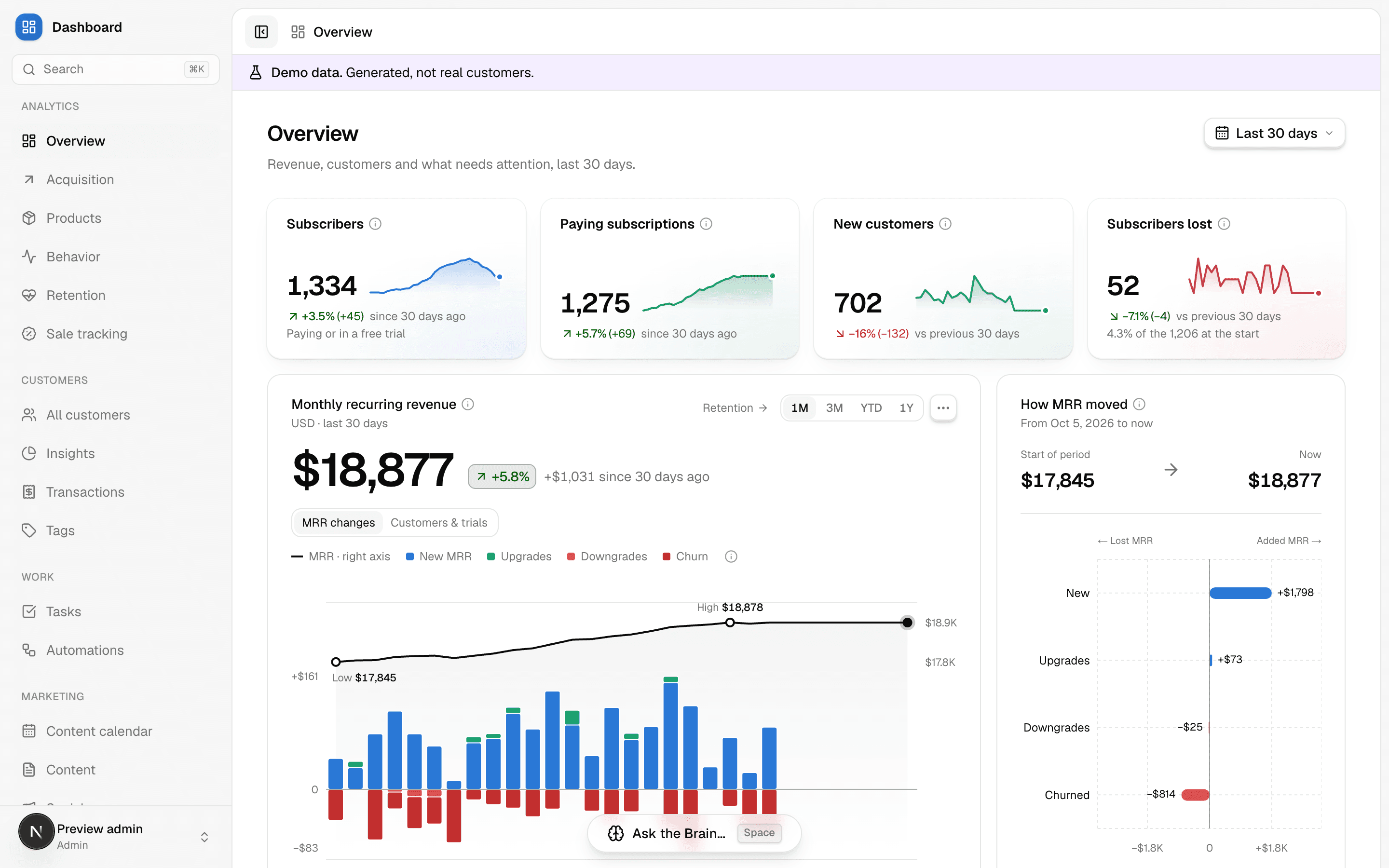
The overview: subscribers, paying subscriptions, new customers and subscribers lost, then monthly recurring revenue over 30 days with its daily changes, and how it moved.

Who it's for

Built for subscription businesses

It fits where recurring revenue runs across several systems, and the missing connection between them matters enough to act on.

  • B2B SaaS

    Decisions it answers

    • Which identified visitors to contact, and why
    • Which accounts need attention before renewal
    • Which sources produce accounts that last
  • B2C SaaS

    Decisions it answers

    • Which users activate, pay, lapse or come back
    • Which acquisition cohorts keep their value
    • Where a high-volume funnel loses customers
  • Memberships and publishing

    Decisions it answers

    • Which campaigns and offers produce retained subscribers
    • Which lapsed members are worth contacting
    • Where engagement or payment breaks down
Founders and owners
Visibility into what's working without staffing a data team.
Growth, sales and success
A prioritized queue with context and a next action, every week.
Finance and investors
Definitions to inspect and reports that reconcile to the records.

One record per customer, from every source

Billing knows who paid, analytics knows what they did, support knows what they said. Open anyone and see all of it together, with every field showing the system it came from.

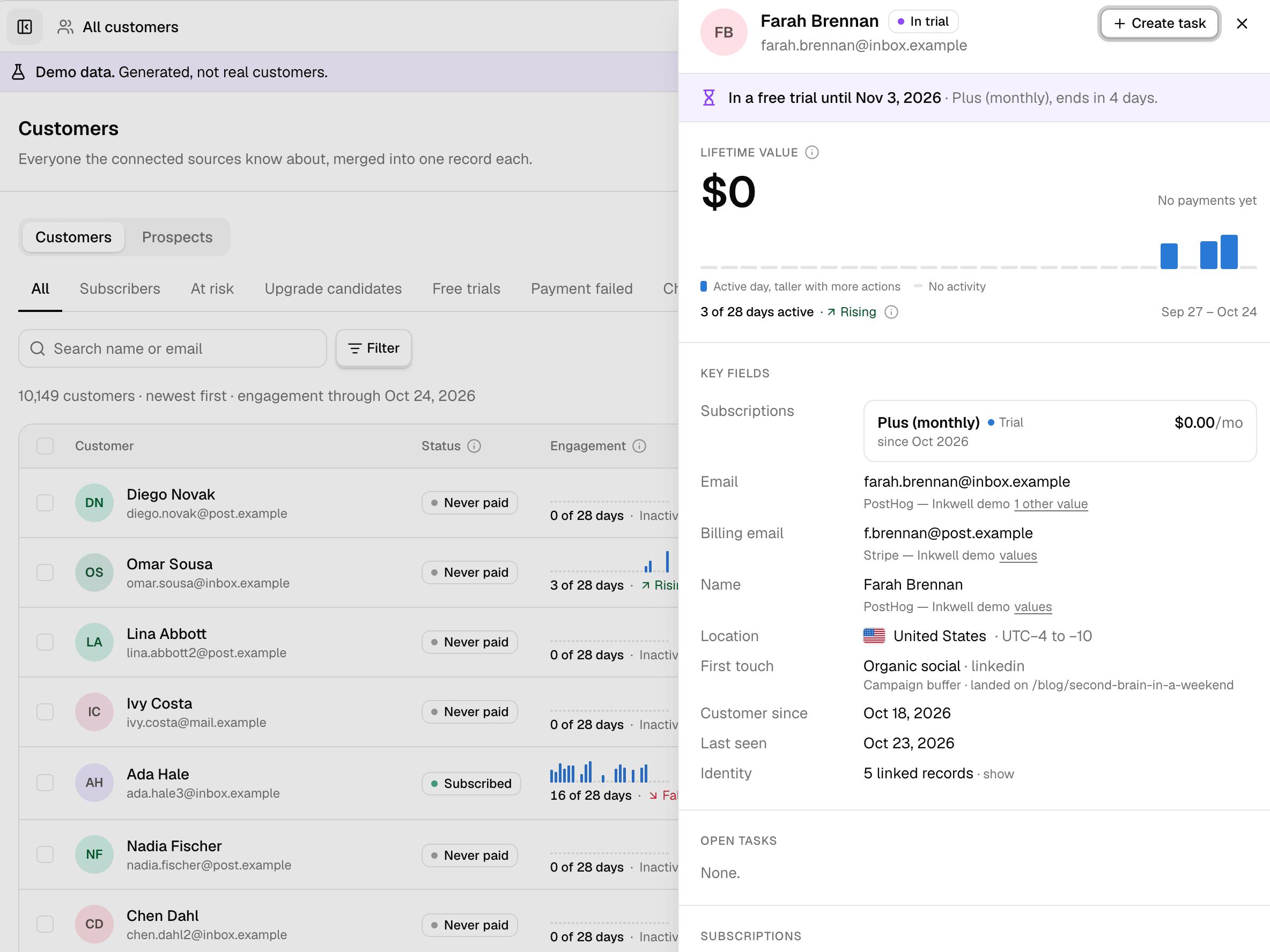
A customer's panel: status, lifetime value, engagement and key fields, beside the customer list.

Value you can trust

Lifetime value net of refunds and lost disputes, per currency, kept in step with the billing events behind it.

Everything on one timeline

Payments, product use, emails and support tickets in one history, with routine activity folded so the signal shows.

Act from the record

Create a task about them in one click, prefilled with the customer, the order and the money at stake.

See who stays, and why the rest leave

Follow recurring revenue as it moves, see which cohorts keep paying, and hear why customers cancel, before the next board meeting asks.

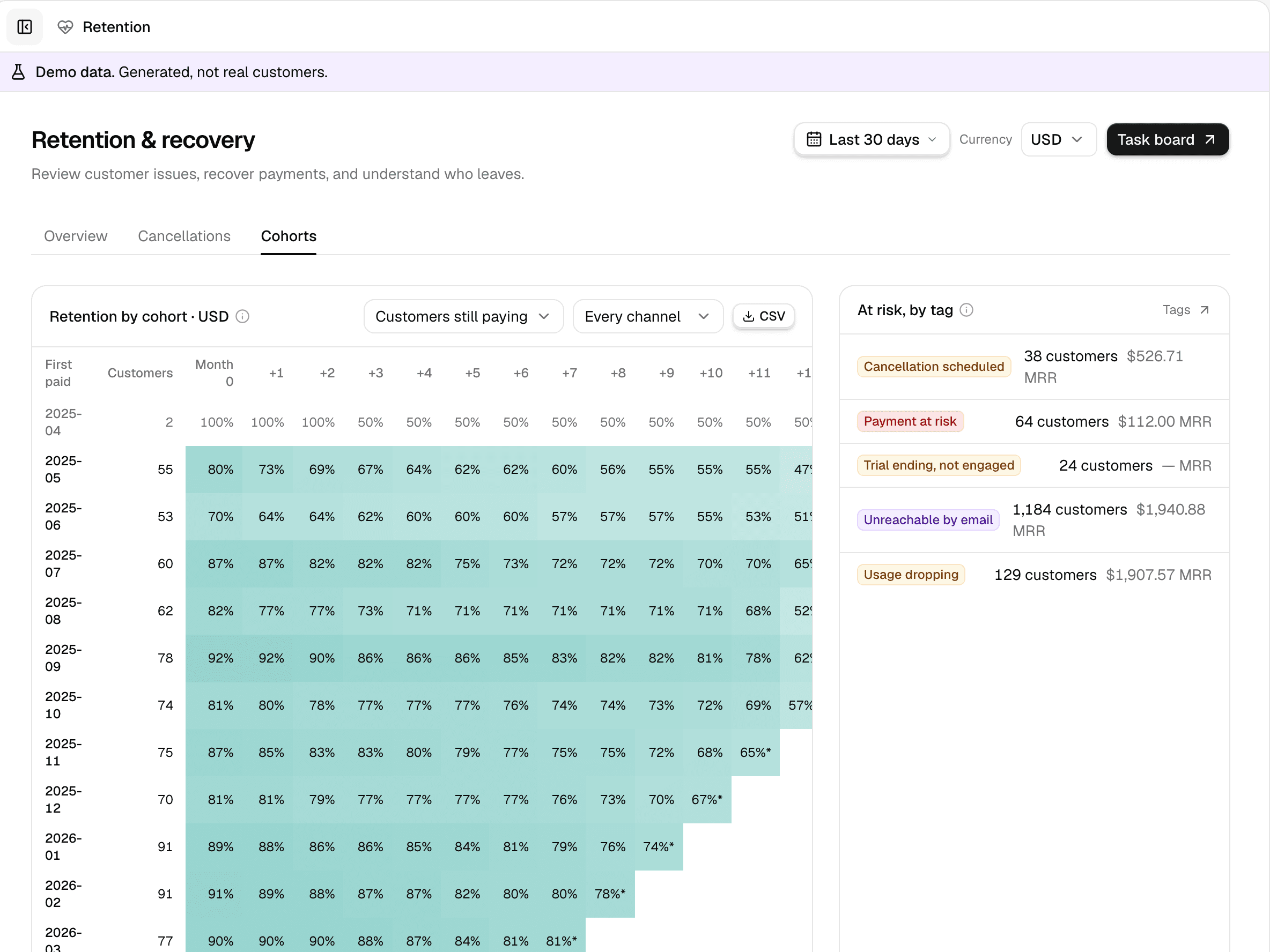
Retention by the month customers first paid, with tags for those at risk.

Where MRR moved

New, expansion, contraction and churn for any period, against the period before.

Cohorts and cancellations

Retention by the month customers first paid, and the reasons they gave when they left.

Trials, honestly forecast

Who is trialling and whose trial ends soon, with any forecast labelled as the estimate it is.

Run sales on numbers, not nerve

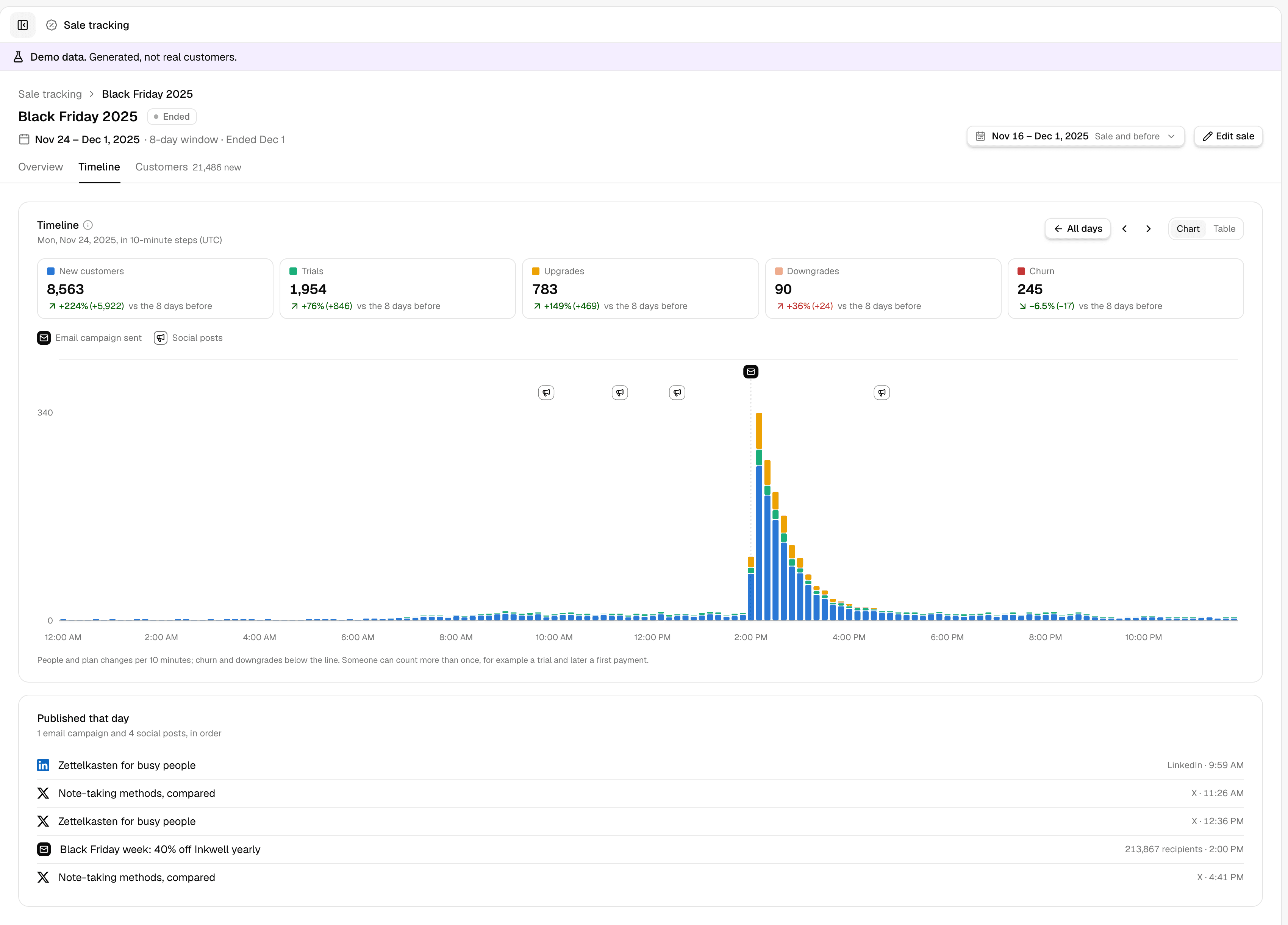
You watch a sale against the days before it, with every email and post on the chart at the minute it went out. Open any day in 10-minute steps and you see which send was followed by a rush, and which by nothing, while there's still time to act on it.

A Black Friday sale's first day in 10-minute steps, from demo data: 8,563 new customers in the sale so far, up 224% on the days before; four social posts with no change after them, then the 2 p.m. email to 213,867 people and a rush of new customers and upgrades, over 300 in ten minutes.

Know by day two

New customers, trials, upgrades and churn during the sale, against the same number of days right before it. You know whether to push or hold while the sale still runs.

Send when it sells

Each email and post sits on the chart at the time it went out, next to what followed. Next year's send times come from this year's chart, not a hunch.

Decide in hours, not in January

Open the hour after a send and choose: re-send, extend the sale, or stop the discount. The campaign itself is one click away in the list beneath.

Rules that turn signals into the right task

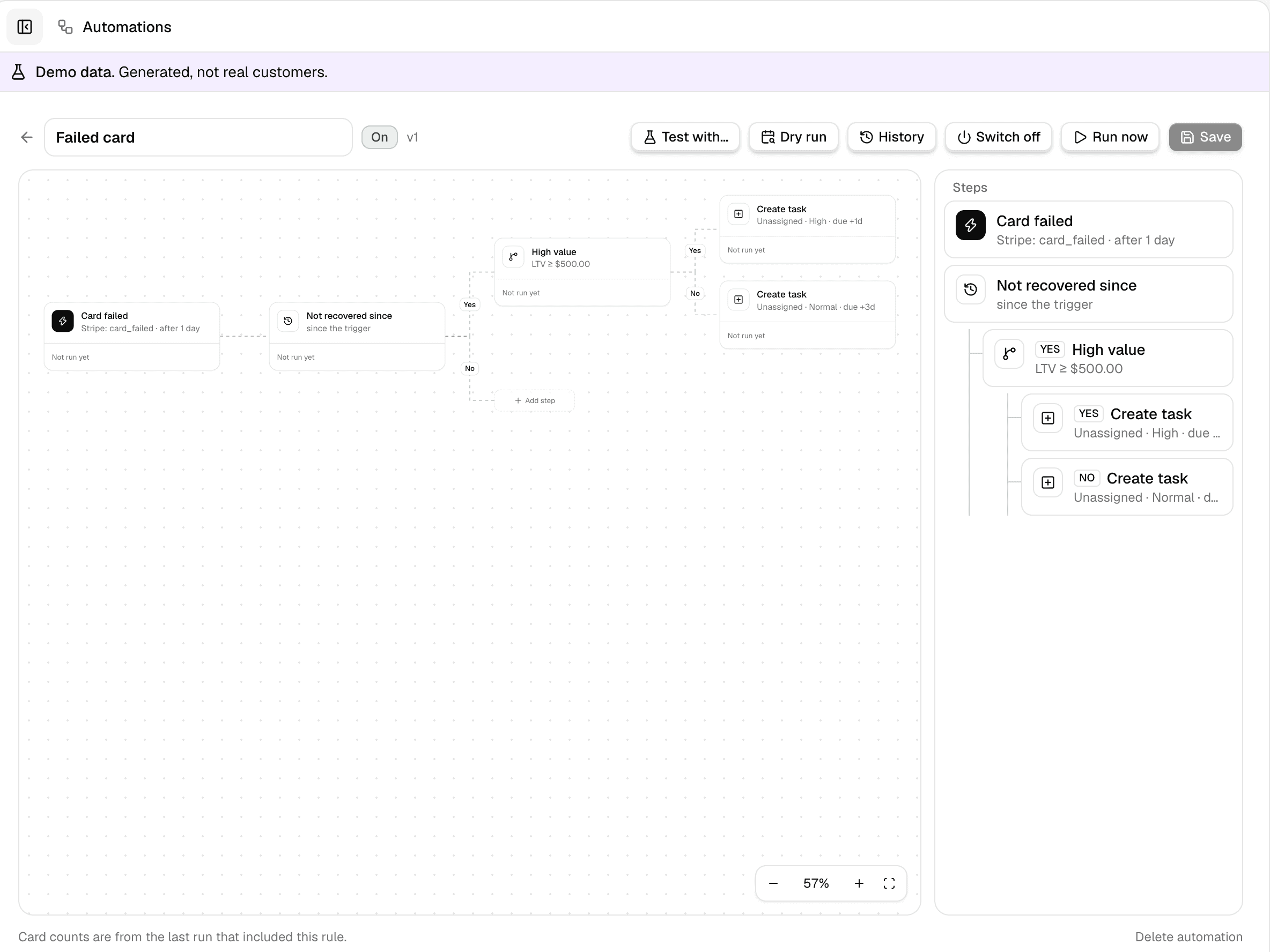
A failed card on a valuable account, a trial ending while the customer is active, a high-value ticket: each becomes a task with the reason it fired and everything needed to act.

The automation builder: a failed-card rule branching on customer value into two tasks.
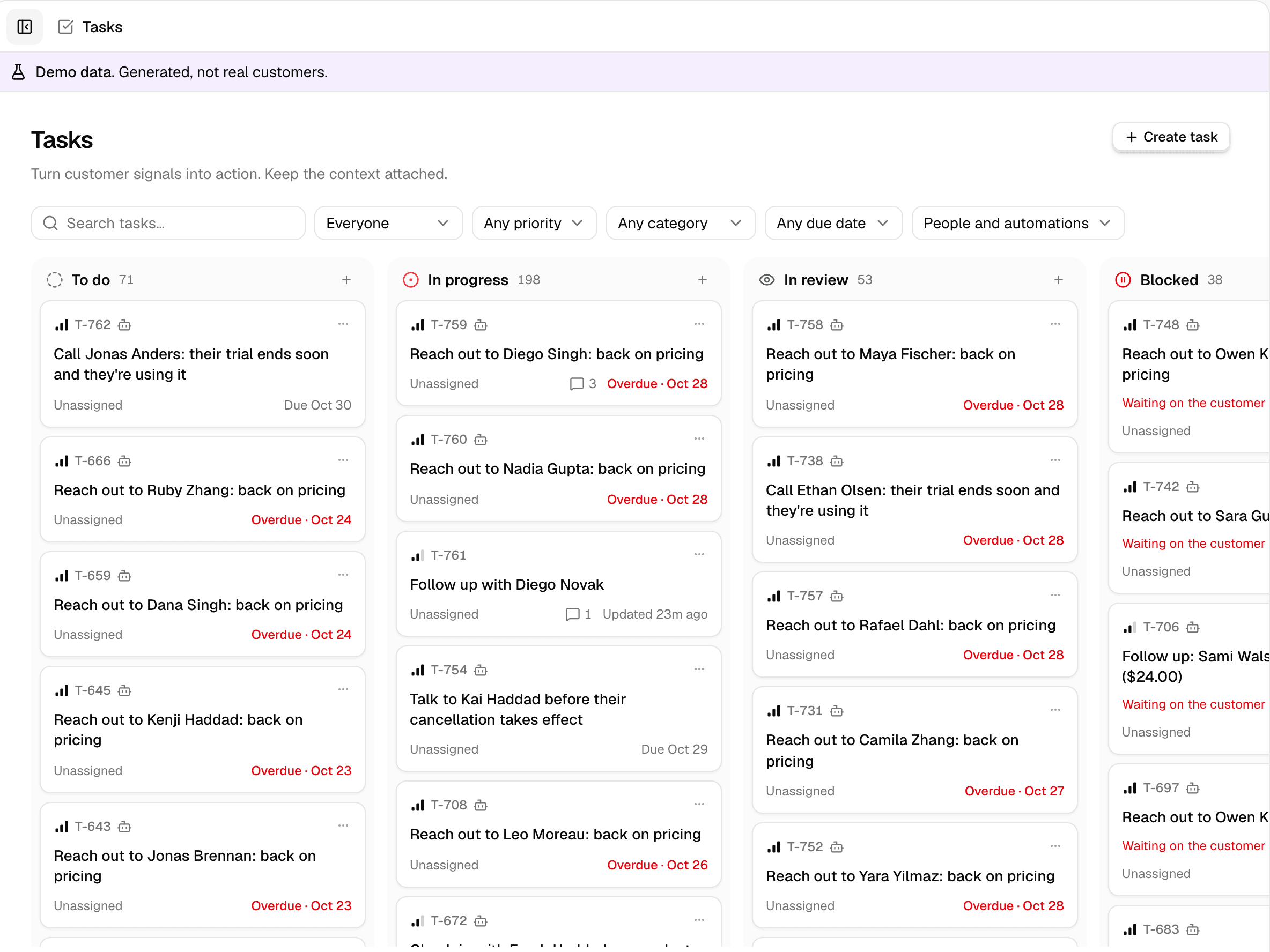
The task board: tasks made by rules, in to do, in progress, in review and blocked, each with its owner and due date.

Rules you can read

Triggers and yes/no conditions on a canvas, explained in plain words on every card.

Dry runs before go-live

Replay a rule over past weeks and see exactly which tasks it would have made.

A board the team works

Owners, due dates, mentions and comments, with duplicates, cooldowns and daily caps kept in check.

Turn website visits into an outreach list

For B2B SaaS: match visitors to LinkedIn profiles, attach what they looked at and where they stopped in signup, and turn the ones worth contacting into tasks with the reason attached.

AM

Alex Morgan

Head of Growth · a 40-person fintech

Matched
  • /pricing3 visits · 4m 10s
  • /docs/api1 visit · 2m 45s
  • /signupStopped at company details

Why now: back on pricing three times this week, and didn't finish signup.

T-214 · To do · High

Reach out to Alex Morgan: back on pricing

LinkedIn profileVisit historyPricing-page ruleEmail via Apollo

Who, and why now

The person, the pages they read, how long they stayed and how far they got through signup.

A task, not a list

Each prospect worth contacting lands on the board with the profile, visits and rule that fired.

Optional email lookups

Your agents can find an available address through Apollo. Missing matches stay visible as missing.

Ask in plain words. Get answers you can check.

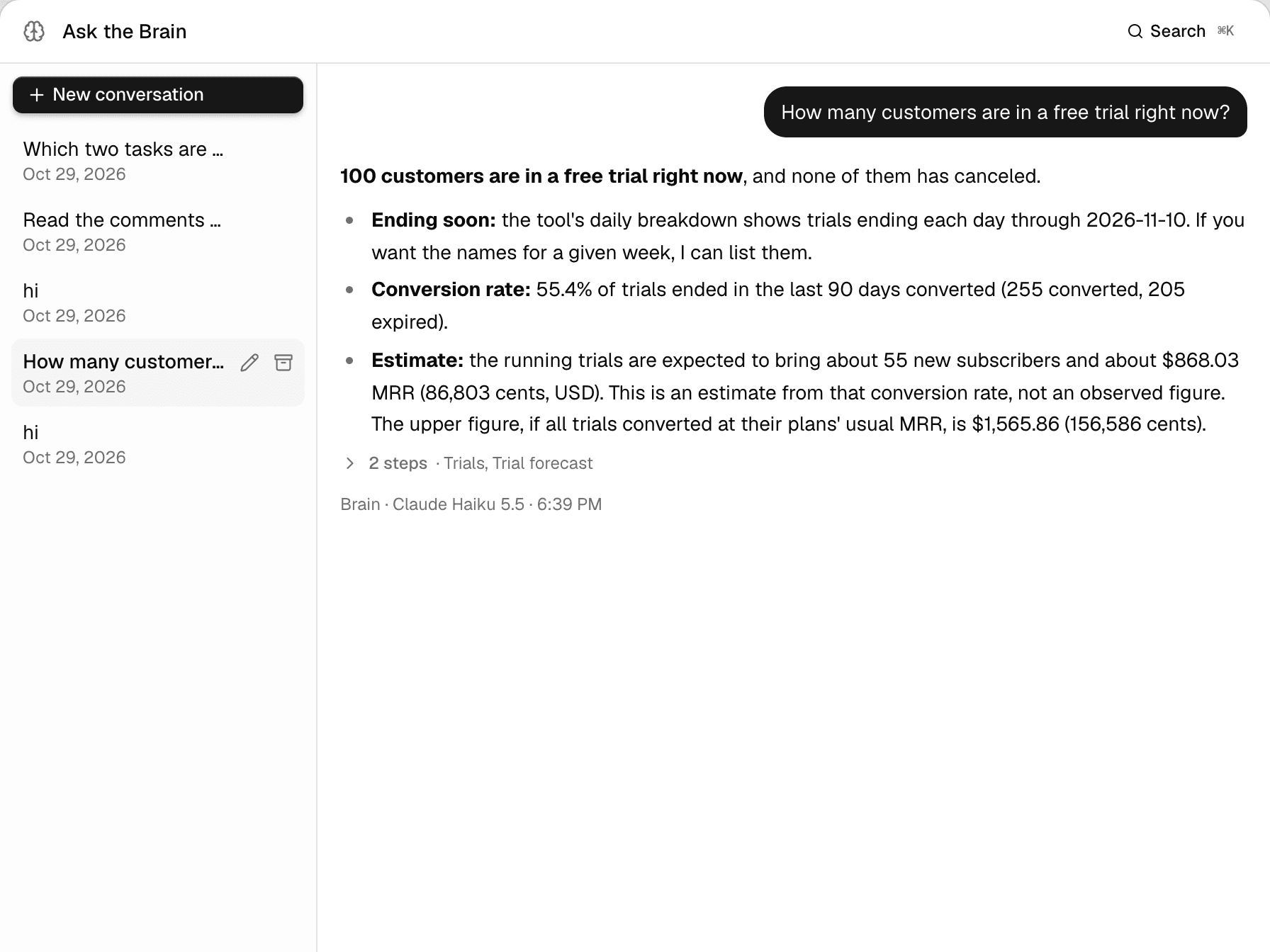
An optional AI agent that works the dashboard through the same tools as your team, links every record it mentions, and shows the steps it took.

Ask the Brain answering how many customers are in a free trial, with the steps it took.

Answers from your data

Every figure comes from a tool call, and every customer or task it names is a link you can open.

Drafts you edit

Tasks, descriptions and comments drafted from the linked records, for you to edit and save.

Under your control

Your own model provider key, providers that keep no data, every action logged, and one switch that turns it all off.

Numbers you can defend to anyone

Owners, finance and investors see the same definitions as the people working the queue, and every figure can be traced back to how it was counted.

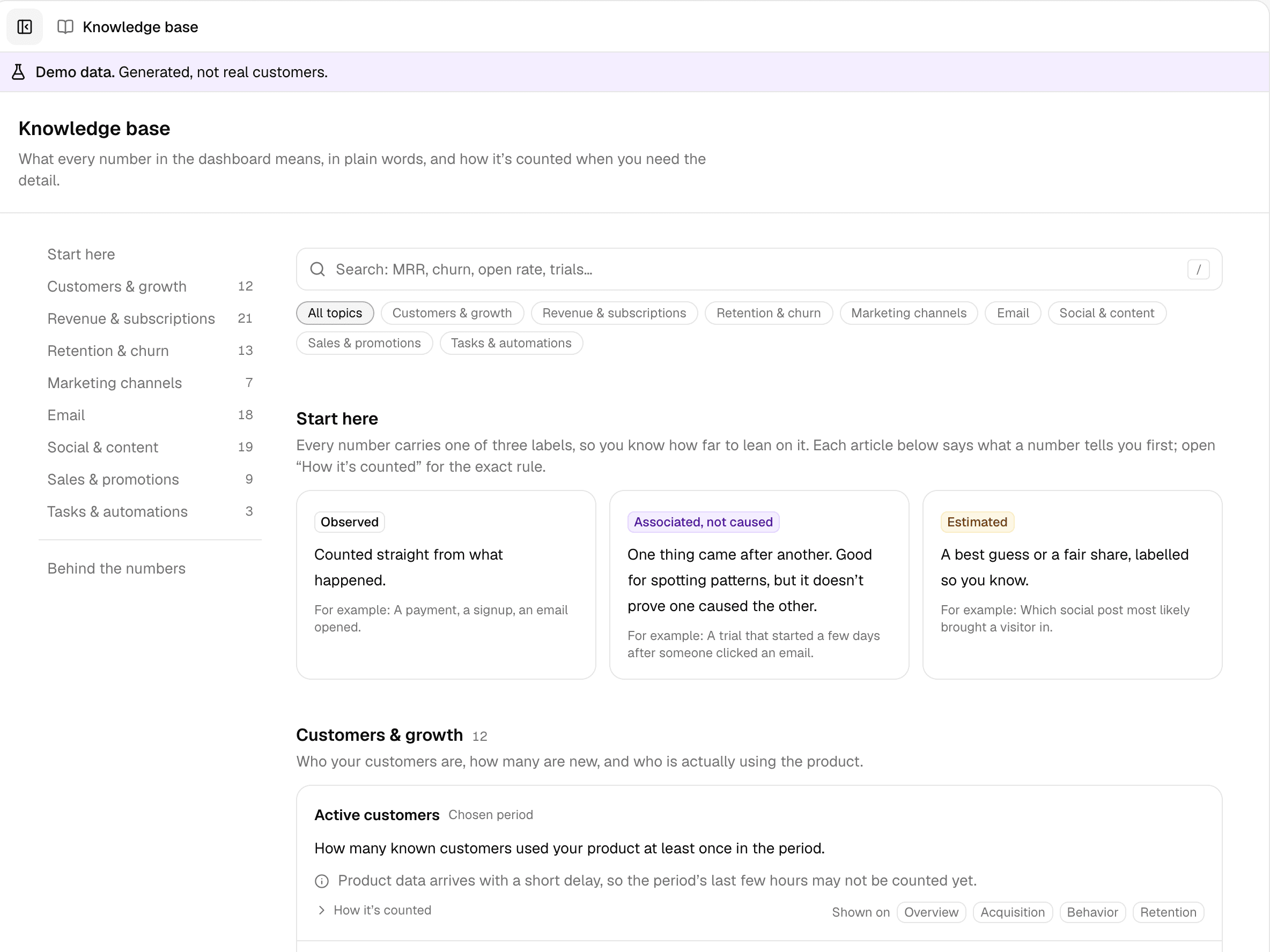
The knowledge base: every figure's definition, grouped by business topic.

A definition for every figure

Each number links to its counting rule in plain words, with the exact rule underneath.

Observed, associated or estimated

Every figure says which it is. A payment after a task is reported as followed by it, never caused.

Checks finance can run

Versioned rules, reconciliation against the source records, and source access to look underneath.

What you get

Everything above comes with every build. Then we build what you ask for.

In every build

  • One record per customerBilling, product use, email, support and acquisition, joined.
  • Revenue and retentionWhere MRR moved, cohorts, cancellations and trials.
  • Rules that make tasksReadable rules, dry runs, and a board your team works.
  • ProspectingWebsite visitors matched to profiles, for B2B.
  • AI BrainAnswers from your records, on your own model key.
  • A definition for every figureCounting rules in plain words, reconciled to the source.
  • Tests and handoverThe test suite, documentation and a defined support window.

Built on request

Ask for more, and it's built into your Dashboard, like everything else.

  • Your own reports and dashboards
  • Integrations we don't list yet
  • Rules and workflows for how your team works
  • Alerts in Slack
  • Whatever else you want it to do

Compare

Owned, not rented.

Dashboard is tailored to you, then yours to run. Here is how that differs from the tools teams usually weigh it against. Open any row for the full detail.

  • Dashboard

    7 of 7

  • Gainsight

    0 of 7

  • ChurnZero

    0 of 7

  • Mixpanel / Userpilot

    0 of 7

What it's built forDashboard: One record per customer, turned into tasksGainsight: Large customer success teamsChurnZero: Customer success playbooksMixpanel / Userpilot: Product usage and in-app guidance
Dashboard:
One record per customer across billing, product, email, support and acquisition, turned into tasks.
Gainsight:
Health scores, playbooks and CSM workflows for large success teams.
ChurnZero:
Health scores and automated success playbooks for subscription businesses.
Mixpanel / Userpilot:
Product usage and funnels (Mixpanel), in-app onboarding and guidance (Userpilot).
Tailored to what you wantDashboard: Tailored to your businessGainsight: Same product for every customerChurnZero: Same product for every customerMixpanel / Userpilot: Same products for every customer
Dashboard:
Tailored to your business and what you want it to do.
Gainsight:
One product shared by all of Gainsight's customers; you work within its settings.
ChurnZero:
One product shared by all of ChurnZero's customers; you work within its settings.
Mixpanel / Userpilot:
Each product is shared by all of that vendor's customers; you work within its settings.
Your infrastructure, your dataDashboard: Your hosting, your databaseGainsight: Shared cloud, data copied inChurnZero: Shared cloud, data copied inMixpanel / Userpilot: Shared clouds, data sent out
Dashboard:
Built for you alone, on your own hosting and database. Your data stays there; it talks only to the services you configure.
Gainsight:
Gainsight's cloud, shared with its other customers. Your data is copied into Gainsight and held under its policies.
ChurnZero:
ChurnZero's cloud, shared with its other customers. Your data is copied into ChurnZero and held under its policies.
Mixpanel / Userpilot:
Each vendor's cloud, shared with its other customers. Your product sends data to Mixpanel and Userpilot, held under their policies.
Every figure can be checkedDashboard: Written definitions, plus the sourceGainsight: Closed sourceChurnZero: Closed sourceMixpanel / Userpilot: Closed source
Dashboard:
A written definition for every figure, and the source to check it.
Gainsight:
Inside Gainsight, closed source.
ChurnZero:
Inside ChurnZero, closed source.
Mixpanel / Userpilot:
Inside each product, closed source.
No per-seat feesDashboard: One quote for your buildGainsight: Per CS seat, plus servicesChurnZero: Seats, volume and modulesMixpanel / Userpilot: Metered by events or users
Dashboard:
One tailored build, scoped and quoted for you. No per-seat fees.
Gainsight:
An annual license per CS seat, usually with implementation services on top.
ChurnZero:
An annual contract quoted on seats, customer volume and modules.
Mixpanel / Userpilot:
Mixpanel by events tracked, Userpilot by monthly active users.
AI on your termsDashboard: Your model key, zero retentionGainsight: Their models and termsChurnZero: Their models and termsMixpanel / Userpilot: Their models and terms
Dashboard:
Optional: the Brain answers from your records in the app, Slack, Telegram or WhatsApp, on your own model key with zero data retention.
Gainsight:
Gainsight's AI agents and copilot, on its models and terms.
ChurnZero:
ChurnZero's AI features, on its models and terms.
Mixpanel / Userpilot:
Each vendor's AI assistants, on their models and terms.
Change how it worksDashboard: Full source accessGainsight: Admin settings and APIsChurnZero: Admin settings and APIsMixpanel / Userpilot: Settings and APIs
Dashboard:
Modify or extend it with source access, including with AI tools.
Gainsight:
Within Gainsight's admin settings and APIs.
ChurnZero:
Within ChurnZero's admin settings and APIs.
Mixpanel / Userpilot:
Within each product's settings and APIs.
Keeps running if you stop payingDashboard: Your version keeps runningGainsight: Access endsChurnZero: Access endsMixpanel / Userpilot: Access ends
Dashboard:
The version you have keeps running; updates are optional.
Gainsight:
Access ends with the contract.
ChurnZero:
Access ends with the contract.
Mixpanel / Userpilot:
Access ends with the subscription.

From each vendor's published materials and public pricing reports, November 2026. Plans and features change, so check their current terms. Gainsight, ChurnZero, Mixpanel and Userpilot are trademarks of their owners.

How we build yours

Start with one decision
you can't make well today.

Delivered in
a few weeks
From your team
Define your metrics with us. We build the rest.
  1. 01

    Name the decision

    Start from a revenue decision that's delayed or wrong today, and what your team does instead.

  2. 02

    Connect and reconcile

    Agree the systems and history to connect, then check a sample of reconciled records together.

  3. 03

    Define, then build

    Your team defines your metrics with us. We build everything around them and how you work: identity rules, views, the queue someone works each week, and whatever else you want it to do.

  4. 04

    Hand over

    Deployment, documentation, the test suite and a defined support window. Updates are your choice after that.

Ownership

Yours to run,
on your terms.

Not another subscription to rent your own data back from: a system tailored to you, on infrastructure you control, with the source to inspect how every figure is made.

No calling home

It talks only to the services you configure: your sources, and your AI and enrichment providers if you use them.

Your provider accounts

Hosting, AI usage and email lookups run on your own accounts, so those costs stay visible and in your control.

Tests and handover

The test suite, CI configuration and operating instructions come with it, so your team can run it.

FAQ

Questions & answers.

Is it tailored to us, or a template?

Tailored. It starts from the decision you can't make well today, and is set up around your systems, your definitions and the queue your team works.

How long does it take?

It takes a few weeks from start to handover, depending on how many systems we connect, and we work with your team throughout.

What do we need to do?

Define your metrics with us: what counts as active, churned, at risk or worth acting on in your business. Then agree which systems to connect, and check a sample of reconciled records together. We build the rest.

We already have billing analytics. Why would we need this?

Billing analytics answers billing questions. Bring one that needs product behavior or acquisition joined to billing, such as which channel brings customers who renew. If your current stack already answers it, you may not need this.

Couldn't we build it ourselves?

You could. Compare a tailored build and handover against your engineering priorities and the cost of maintaining your own connectors, identity matching, definitions and tests.

Who runs it afterwards?

Your team, with named responsibilities, deployment documentation and a defined support window. Updates after that are optional.

How do we know the numbers are right?

Trace any figure to its definition, its source records and the reconciliation checks. Source access makes that scrutiny possible; it doesn't certify your inputs, which is why acceptance starts with a reconciled sample of your own records.

Where does our data go?

Into your own database, on your own hosting. It only talks to the services you configure. The AI features are optional, use your own model provider key with providers that keep no data, and switch off in one click.

How is it priced?

Each build is tailored to your systems and the outcome you want, so we quote after a conversation about your situation. Hosting, AI usage and email lookups are billed to you directly by those providers.

Does visitor identification work for every visitor?

No. It depends on what the identification and enrichment providers you connect can return. Unmatched visitors and missing email addresses are shown as such, never guessed.

Tell us the decision you can't make well today.

We'll tailor Dashboard to it, with your team defining your metrics, and hand it over in a few weeks.